AI and Statistical Analysis
AI coding assistants are increasingly part of how research work gets done — including meta-analysis. Used well, they're a real accelerator. Used carelessly, they can quietly introduce errors into work that's supposed to be reproducible and defensible. This page is about the difference.
What AI is genuinely good at here
Assistants are strong at the mechanical, repetitive side of a workflow: writing a script that runs the same extraction or analysis over many datasets, wiring tools together into a pipeline, drafting boilerplate code, or explaining what a command's output means. That's exactly the kind of work described in ProMeta CLI — batch processing, automation, reproducibility.
Where it's risky — especially in meta-analysis
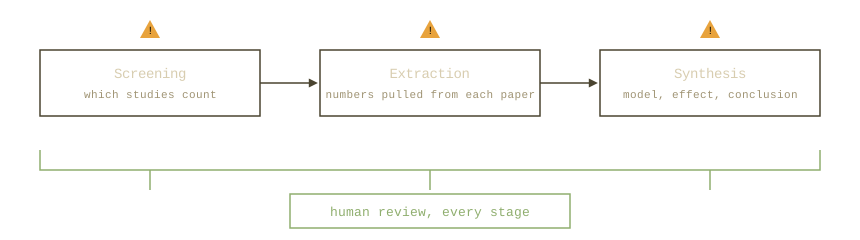
Meta-analysis depends on getting a lot of small things exactly right: which studies are included, what numbers were extracted from each one, which model and settings were used. AI systems, by nature of how they generate text, can fail in ways that are easy to miss in this context:
- Fabricated references. A model can produce citations to papers that don't exist, or that exist but don't say what's attributed to them — confidently and without any visible sign of doubt.
- Inaccurate data extraction. Asked to pull effect sizes, sample sizes, or other numbers out of a paper, a model can misread the source or invent plausible-looking values instead of the real ones.
- Unreliable study screening. Deciding whether a study meets inclusion criteria requires judgment; delegated fully to AI, this step can both admit low-quality studies and silently drop relevant ones.
- Silent error propagation. If a mistake exists anywhere upstream — in a source document, a prior extraction, a draft script — a model will often build on it rather than catch it, and its output gives no indication that anything is wrong.
None of this shows up as an error message. The output reads just as confidently whether it's correct or not — which is what makes it dangerous in a context where the whole point is that the numbers are trustworthy.
The right way to use it (briefly — this is beyond what this site covers)
The pattern that avoids these pitfalls isn't complicated, even if it's outside the scope of a software page to teach in full: keep a human in the loop for every judgment call, and verify every extracted number against its original source rather than trusting it on sight. Use AI to write and review the code that does the work, not to produce the analysis's conclusions directly. Keep the scripts it helps you write under version control, so every step of an analysis is something you — or a reviewer — can read, rerun, and check line by line.
Why the CLI, not a chat window
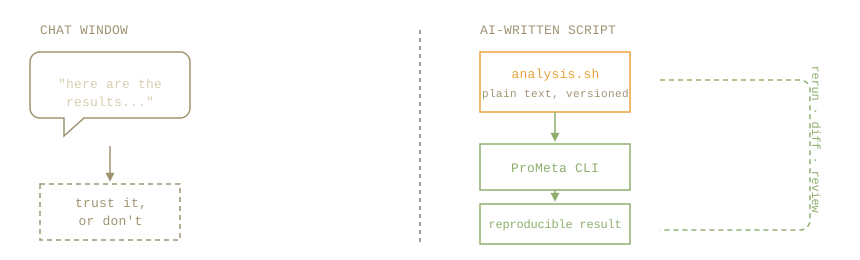
This is exactly why the ProMeta CLI is the right surface for combining AI with real analysis work, rather than pasting data into a chat and asking for results. A command-line tool turns "ask AI for an answer" into "have AI write a script that produces an answer" — and a script is text: it can be read, diffed, versioned, rerun on the same data to confirm it's deterministic, and handed to a colleague to check. A chat transcript can't offer any of that. The output of a script is only as trustworthy as the script itself, and a script — unlike a paragraph of prose — is something you can actually audit.
Teaching an AI to use the CLI
You don't need to explain the commands yourself. Once the CLI is built, just have your AI assistant run:
prometa manual
prometa --help
prometa manual prints the full command reference (the same one on
Commands and usage) straight to the terminal, and prometa --help
lists every command; prometa <command> --help gives the exact options for one of them. An
assistant with terminal access can read all of that itself — that's usually enough for it to write
a correct script without you having to paste in documentation by hand.